Linh Huynh
Loop
In the loop with your group

This is a project that 2 students and I worked on for our ISM 220 class, Interactive Design & Prototype. Our challenge is to attempt to understand and work with the process of group collaboration and coordination.
Interviews:
The goal of our user research was to learn the preferred ways on how students communicate, coordinate, and collaborate with each other when working together, and their negative negative experience. Through our research, we also wanted to comprehend what kind of issues do students encounter in group projects that correspond to the coordinating and collaborating process, and if possible, what caused those issues to surface. Once we decided to focus on college students and their experiences with group projects, we each went around campus and interviewed 2 students. Not only did we interview students, we also posted a survey on the DePaul Class of 2020 FaceBook page. Below is our interview and survey questions.
Interview Questions:
-
How do you feel about group projects?
-
How many group projects have you been in?
-
What were the topics you worked on?
-
How often did your group meet and for how long?
-
What were the communication methods?
-
What do you use to share information and documents?
-
How do your group brainstorm on the topic?
-
Did everyone reply to messages/emails?
-
What was your most successful group project?
-
What was the worst group project you experience?
-
How is the work usually split up in the group?
-
Was there a time where the project did not work as expected?
-
What happened?
-
Who did their part?
-
How was it resolved? Was it resolved?
-
Survey Questions:
-
Have you ever been involved in a group project?
-
Did everyone in the group end up doing their part of the project?
-
If no, please explain.
-
-
Did the project go as planned?
-
If no, please explain.
-
-
What was the main form of document sharing within your group? (ex: Google Docs, e-mail, etc.)
-
If there was ever a worst experience scenario for any previous group project, please explain below (avoid mentioning names)
After the interviews and getting the results back from the surveys, we came together as a group to look at the results. We did an Affinity Diagram where we grouped similar results into categories. From those categories, we were able to see where we were getting the most responses and why we were getting a lot of responses for that category. We learned that the main issues that people had was that there was always at least one person that doesn't contribute or do their work last minute. Another main issue was that people tends to not reply to messages or takes them a while to respond back causing there to be a communication issue.


After the clustering, we used those results to come up with our insights and design principles for the app. We decided to focus on the theme of communication and progress checking since they were the main issues that we found from our responses.
Insights:
-
Theme: Communication
-
Most of the group projects failed due to the lack of communication
-
Most of the issues began because of the lack of communication.
-
Members tended to reply last minute or don’t reply at all
-
-
Theme: Reminders/progress
-
Most members decided to do their work very last minute
-
The active group members were worried about the last parts being done
-
There is no way to tell if members are getting work done (because of the lack of communication)
-
Design Principles:
-
A successful solution will allow group members to communicate sufficiently.
-
A successful solution will encourage group members to collaborate with each other outside of the classroom.
-
A successful solution will let members be in the know with real time updates.
-
A successful solution will remind members to do their work.
-
A successful solution will allow members to schedule out their work.
-
A successful solution will motivate individual group members to do work on their own.
Concepts:
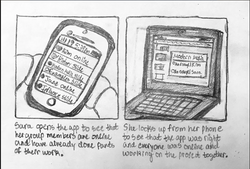
Before we began to design our app, we came up with 2 scenarios, interface sketches, and user stories. These concepts helped us know what functions we want in our app, how we want our app to look, and why the user would be using the app for group collaboration.
Scenario 1: When working on a project in science class, John and his group discussed ideas on what to do as their topic. A variety of topics were discussed, but John did not take notes. As soon as he got home, John wanted to contact someone in his group about the notes that were taken during discussion, but he did not have their number. He, instead, logged on to the app his group was using for their project: Loop. As soon as he was logged on and was presented with the main menu, he clicked on the chat icon and chose the person in his group that he wanted to message. John clicks out of the app and then later gets a push notification that the person had messaged back with a picture of the group’s notes.
Scenario 2: After a long week of classes, Mary decides to take a break from homework and projects on Friday—even though she has a project due on Sunday at midnight. At 4:30 PM, Mary gets a notification on her phone and sees that it is a reminder that her work is due in a couple of days. Choosing to ignore it, she shuts off her phone. On Saturday evening around 4:30 PM, Mary gets another notification about her project: “Your other group members have finished their work; Don’t forget about yours!” Mary, then, decides to finish her part of the work. She logs on to her group project app, turns off the reminders and starts working on her project.
 |  |
|---|---|
 |  |
 |  |
 |  |
Low-fidelity Prototype:
Before we built our paper prototype, we came up with user stories that is based on our design principles. The user stories was used to help us design the paper prototype to solve problems users have when it comes to group collaboration. After coming up with the user stories, we started with sketches for each page of our app. We found that it was helpful to sketch out possible designs first because it allowed us see what design patterns we can use and which design was too complicated or simple.
User Stories:
-
As a student, I want to see who saw the messages so that I know if everyone got it and knows what is going on.
-
As a student, I want to be notified on when to do my part of the group work so I can plan accordingly and not do it at the last minute.
-
As a student, I want to chat with my other group members so that I can ask them any questions I have about the project.
-
As a student, I want to be able to let members know and see how far along each member is on their part of the group project.
-
As a student, I want to be able to video chat my group members so we can talk “face-to-face” about our project work.
-
As a student, I want to be able to show my group the work I have done to get some feedback on it.


Paper Prototype:
Because our app is designed to better support group collaboration, we made our app to be mobile. Based on our research, users tends to message other members through text, We also found that users tend to choose their phone over the web to keep in touch with their group. Another reason why we chose to do a mobile application is that it is more convenient for the user and mobile apps have become more popular than website to connect with others.


Features:
While designing our paper prototype, we came up with 5 features to focus on from our design principles: recent activity, chat, calendar, to-do list, and notification.
-
A Recent Activity page
-
To allow the user to be up to date with that’s going on in their group. Once the user is logged in and picks their group, the recent activity page is the first page they see. From here, they can go wherever they want in the app.
-
-
A Notifications feature
-
To allow users to be notified on what work they have left and what work others have done.
-
-
A Chat feature
-
To allow users to chat with other members of their group through the app (without having to give away personal information). Users can individually message members or their whole group. Also, they can video chat with one other person or their whole group.
-
-
A To-Do List feature
-
To allow users to keep themselves up to date with their work and, more importantly, to motivate them to do it.
-
To allow users to keep themselves up to date on work that other group members have done.
-
-
A Calendar feature
-
To allow users to schedule out their work for themselves and to schedule to work with others.
-
High-fidelity Prototype:
For our high-fidelity prototype, we used Axure to design our app. As mentioned before, we focused on communication and progress checking in our app. After doing designing both our low-fidelity and high-fidelity prototype, we did user testings with other students from our class, the professor, and students on campus. To help us with the testings, we came up with task scenarios that focuses on our features and user stori.
Task scenarios:
-
Imagine you are a student that’s assigned to do a group project for your ISM 220 class, and your group found a new app that supports group collaboration. Imagine you already have an existing account. First, login and click on your group.
-
Now that you are logged in, let’s say a member from your group named Gaby sent you a message asking for help on the project. Can you show me how you would respond to her message?
-
Now, imagine your group members want to video chat to discuss topics for the group project using this app. Can you show me how you would do this?
-
Next, let’s say you finished what was left of your part of your project and would like to update the to-do list. Using this app, how would you go about doing this?
-
Now, let’s say your group project is due on October 20 and you want to add that event to the calendar. Can you show me how you would do this?
-
Lastly, you realized that you no longer want to use the email that is registered in the app, and you would like to change it. Can you show me how you would do this?
Problems:
One of the hardest parts of this project was a feature we were excited to try: Notifications. Once we finished our research, we believed that notifications would help users in keeping track of when they would have to do their assignments. Unfortunately, once we started the process of designing the whole app, we did not know how to involve this feature in a way where the user would not be able to ignore their notifications, and we did not know how to solve this. We still included it in the Settings feature, but there is really no set solution that we implemented throughout our app. If we were to do this differently next time, we would try to include the notification feature. Also, instead of focusing just on the bad side of the group projects in our initial research, we should have also looked into what made group projects work and what made them successful.
Conclusion:
As stated before, group projects play an important role in any student’s academic career, especially college students. There seems to be a certain stigma around group projects in college: no student enjoys group projects because most tend to favor individual work as opposed to working with others who may or may not complete their work on time or cooperate with others. For this reason, we have developed an app designed to make group projects a bit more enjoyable. Users can communicate with group members through text or video chat, they can schedule out their due dates, they can make sure they are up-to-date on their work, and so much more. We developed this app in hopes of making group projects go as smooth as possible; users will constantly be in the loop with their group.
Reflection:
Looking back on the whole process to get to the high-fidelity prototype, there were ups and downs when it came to designing our prototype. But doing this project and working with a team gave me experience to take with me moving forward and out of the class room. My biggest takeaway from this project was what it is like to work in a team over the 10 weeks of this project. We had to schedule out a day where we would all meet up to design and work on our app. Even when we couldn't meet up, we had strong communication like when we text each other in a group chat and replying back in a reasonable time.
Axure was a tool that we used to create the app and a powerful tool that we got to learn to use. I think that being able to learn how to use Axure and the tools was another big takeaway from this project. I was able to learn high level skills by the end of the project and have a good sense on what I can do and use for my future design with Axure. What I would change for this project would be the interactions and the design of some pages where I can use more skills from Axure after doing more practice and learning other ways to make the interactions smoother. Another thing that I would change would be figuring out how to include notification into the app and showing it in the app as a feature instead of having it just in the settings. But overall, I think my team and I designed a simple and straight-forward app that better supports group collaboration for college students.